Sunday, 19 October 2014

How to Pay TDS on sale of Immovable property

TDS is applicable on sale of immovable properties as per Finance Bill of 2013. Where in the sale consideration of property is equal or exceeds to Rs. 50,00,000.
According to Sec 194 IA, the Income Tax Act, 1961 TDS is applicable from from June 1, 2013  for sale of poperty excessding Rs 50 lacs. At the time of making payment of sale consideration, Tax @ 1% should be deducted by the purchaser of the property.

Payment of TAX

  • Payment of Tax can be made by e-Tax payment option, available at NSDL through any of the authorized bank branches. Tax so deducted should be deposited to the Government Account.
E-payment
  • E-Payment facilitates payment of taxes online by taxpayers.
Pre-requisite
  • Purchaser of property can deposit Tax with any authorized bank with net-banking account option.
  • For list of authorized banks, please refer.

Steps to pay Income Tax online

step-to-pay-tax-online
Log on to NSDL-TIN
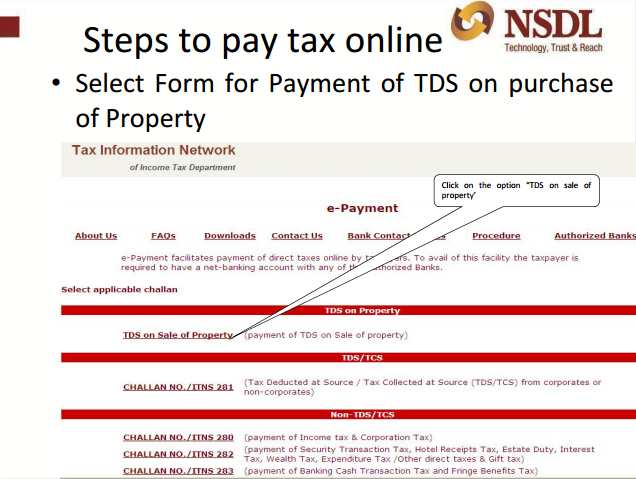
  • Under TDS on sale of property, click on the option “ Online form for furnishing TDS on property”.
online-form
Online form for furnishing TDS

  • Select form for Payment of TDS on purchase of property. Click the option “TDS” on sale of property.
form-of-payment
form of payment
  • Select Financial Year from the drop down for which payment is to be done.
  • Select Tax applicable for which payment is to be done.
  • Mention PAN of Transferee/Buyer (Don't have PAN visit here to, Apply for new PAN).
  • Mention PAN of Transferor/Seller.
  • Re-enter PAN of Transferee/Buyer.
  • Re-enter PAN of Transferor/Seller.
e-payment
e- payment
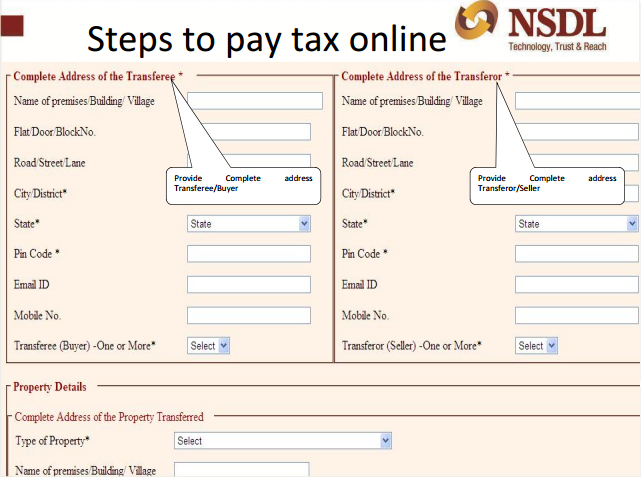
  • Provide Complete address of Transferee/Buyer.
  • Provide Complete address of Transferor/Seller.
  • Provide Complete address of Property transferred.
steps-to-pay
steps to pay tax
  • Mention the date of Agreement/Booking of property.
  • Mention the Total value of consideration (Property Value).
  • Mention if the above payment is done in Lump sum or in Installments.
pay-tax
pay tax
  • Please select the amount paid/credited (Enter the amount paid to the Transferor/Seller).
tax-online
steps to pay tax online
  • Please enter the TDS rate (Tax rate at which the TDS was deducted by the purchaser at the time of purchase of the property).
  • Please enter the TDS amount to be paid (amount deducted by the purchaser at the time of purchase of the property).
online-tax
online tax
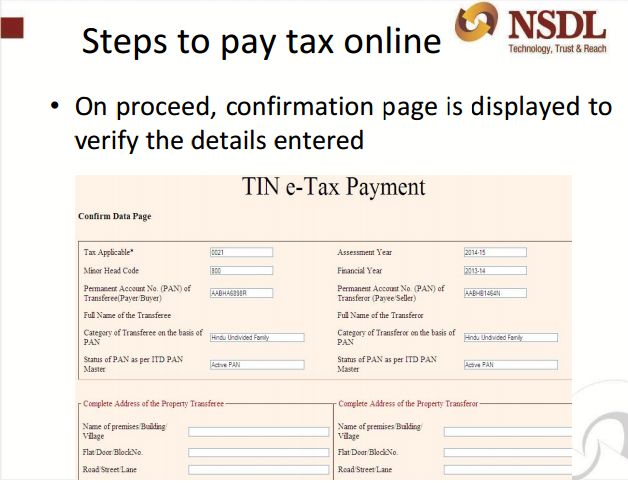
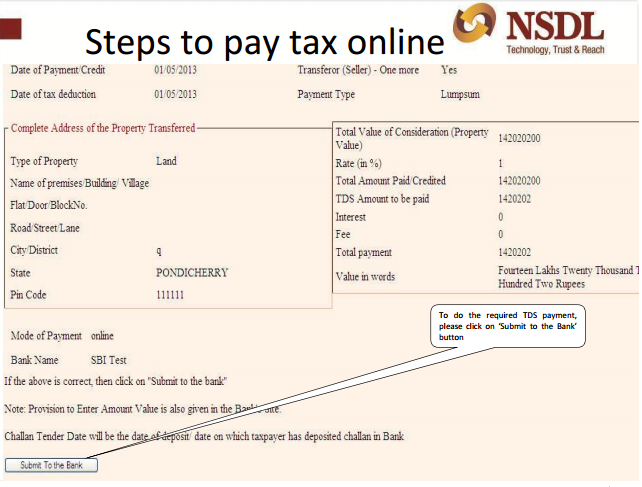
  • On proceed, confirmation page is displayed to verify the details entered.
e-tax
e tax
  • In case you have made a mistake in data entry, click on “EDIT” to correct the same.
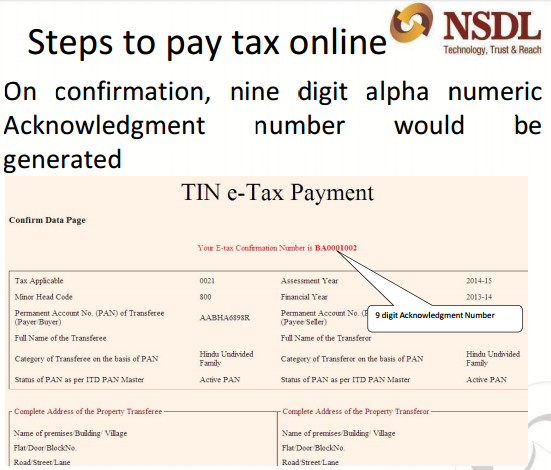
  • On confirmation, nine digit alpha numeric Acknowledgment number would be generated.
  • To do the required TDS payment, please click on ‘Submit to the Bank’ button.
  • On clicking on Submit to the Bank, deductor will have to log in to the net-banking site with the user ID/ password provided by the bank for net-banking purpose.
steps-online
steps for pay online tax

  • On confirmation, nine digit alpha numeric Acknowledgment number would be generated.
conformation
conformation

  • To do the required TDS payment, please click on ‘Submit to the Bank’ button.
submit
submit

  • With the user ID/ password provided by the bank for net-banking purpose, the detector will have to login to the net-banking site on clicking on Submit to the Bank.
  • Enter payment details at the bank site, on successful login.
  • The bank name through which e-payment has been made; payment details and containing CIN will be displayed on successful payment a challan counterfoil.

Points to remember while depositing Tax online

  • From the sale consideration of property deduct tax @ 1%.
  • In the online Form for furnishing information regarding the sale transaction, PAN of Seller as well as Purchaser should be mandatory furnished.
  • In quoting the PAN or other details in the online form do not commit any error as there is no mechanism for rectification of errors. You are required to contact Income Tax Department for the further purpose of rectification.
  • Field marked with * are mandatory.
  • In any of the fields do not enter double quotes (“ ”).
In case of any further queries/concerns please contact TIN Call Center at 020-27218080 or email  at  tininfo@nsdl.co.in

Saturday, 18 October 2014

Check your PAN Name, Verify PAN

Check your PAN Name, Verify PAN

Their is frequent queries on how can i verify pan details, PAN no income tax assessing officer ward and circle no. or how can i track status of my PAN application status.
To know about PAN related information including PAN address and PAN details, we provide below five tricks to verify PAN .
Query 1: How to check PAN Name/or How to Verify your PAN ?
Reply:  If you want to check your PAN name, PAN jurisdiction and to check whether a PAN number is correct or incorrect, then
  1. Click here => and Just fill your PAN in the Box and
  2. Enter the captcha code of six numbers and
  3. Click on submit button.
  4. Your PAN details will be shown in a new window.

PAN-details


Query :  I have applied for new PAN. Please advice how can I verify PAN application status?

You can get PAN application Status by visiting the agency you have applied your PAN number.

If you have applied PAN through, NSDL then, please click here.

Following Inputs information are required: 

1) 15 DIGIT ACKNOWLEDGMENT NUMBER OF PAN APPLICATION

                                                                 OR
2) NAME & Date of Birth/Incorporation/Agreement/Partnership or Trust Deed/Formation of Body of Individuals/Association of Persons
OUTPUT RESULT: YOUR NAME, PAN, DATE OF DISPATCH of PAN Card

Following Inputs information are required: 

1) 15 Digit Coupon Number Or Application Number
 OUTPUT Result: Your Name, Pan, Date Of Dispatch

Query: How can I Apply for new PAN ?

Reply: Please visit here to apply for new PAN

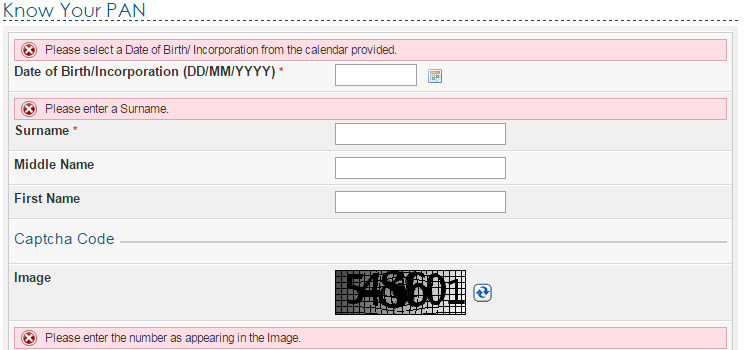
Query : How can I know about my PAN number by filling Name & DOB/DOL? 

ReplyYou can click on this link to know your PAN no. or verify PAN no of any other individual.
1.         DOB
2.        Surname and
3.        Individual Name
4.       Captcha Code.
5.       Click on submit
It will take you to new window and will show the PAN no.

know-your-pan
Check your pan number
In case, their are multiple PAN card holder with same name and DOB then in next window it will ask to verify and enter following details
  1. Father’s First name ,
  2. Father’s middle name and
  3. Father’s surname.

Query 4: I have entered the PAN name and surname correctly. But still I am not able to find / or verify my PAN number ?

Reply: With the right spelling it’s very difficult to put first, middle, surname. In case you are still not able to verify pan no then please call customer care number at 1800 180 1961

Query: How to check Status of PAN for HUF ?

Reply: To know about HUF, Firm, Company etc PAN number full name is to be filled in the column of surname and DOB column, date of Incorporation is to be given.
To ensure that you are able to verify your PAN details , please remember following things :
  1. Enter the name you have filled in PAN application.
  2. Make sure that you have not entered your surname as first name and vice versa.
  3. If your name is of one word only then Surname column is must then fill it in surname. Suppose Neeraj is your first name then to know PAN number fills it in surname.
  4. ie enter Name as Neeraj and surname as Neeraj
  5. Fill the date of Birth (DOB) in dd-mm-yyyy format .Use – as separator and please don’t use / backslash. (Dot) or_ (underscore).
  6. Never give application to PAN agents to fill in your PAN applications
  7. Keep a copy of PAN application with yourself.
Query:  How to Track Your PAN through SMS If Applied On NSDL/TIN-FC ?
INPUT: SMS to 53030 with a message containing followed by a space the word PAN and the acknowledgment number of 12-digit provided at the time of submission of application i.e PAN ACKNOWLEDGEMENT NUMBER.
SMS to 53030 with a message contain followed by space the word TAN and the acknowledgement number of 14-digits provided at the time of submission of application i.e, TAN ACKNOWLEDGEMENT NUMBER.
 OUTPUT: Your PAN, Name, Date Of Dispatch
Query:  I dont understand the key words in PAN number. Can you please explain the PAN Structure?
Reply: Permanent Account Number (PAN) is issued by Income Tax Department is a Ten digit alphanumeric identifier. Each assesses is issued a unique PAN e.g- individual, firm, company etc.
  • 1-5 fields are alpha (A to Z)
  • 6-9 fields are numeric (0-9)
  • 10 fields is alpha (A-Z)
1.    Forth field of pan denotes assesses status :
  • for individual=”P”
  • for Company=”C”
  • for Trust =”T”
  • for partnership firm=”F”
  • Body of Individual:”B”
  • Association of persons:”A”
  • HUF=”H”
  • Local authority:”L”
  • Govt.=”G”
  • judicial artificial person:”j”
2. Fifth field of PAN denotes
In case of individual: Surname/last name(as given in pan application)
  • for ex. in case of Deepak Kumar(individual)
  • 5th field will be “K”
  • 4th field will be “P”
  • In case of Deepak Kumar Gupta(Individual)
  • 5th field will be “G”
  • 4th field will be “P”

  • In case of All Other Assesses 
  • 5th field will be first letter of Name/first Name
  • for ex : In case of Rahul Gupta and sons (HUF)(confirmed)
  • 5th field will be “R”(first letter of First name i.e Rahul)
  • 4th field will be “H”(for Huf)
  • for ex: in case of Reliance LTD (confirmed)
  • 5th field will be “R”(first letter of First name)
  • 4th field will be “C”(for company)

Query: Is it compulsory, to file return if i have PAN card? 

Reply: No, It is not mandatory to file Return if you have PAN card. Return filling is compulsory if your total income in current year is above the exempltion limit. For current year income tax slab visit here.

Query: I want to file income tax return. Can you please help? 

Reply : Yes, we can assist in filling tax return online ,
If it is salary Return, Please visit here.
If you are professional then please click here for professional Return

Thursday, 9 October 2014

Last date for DDA housing scheme extended to Oct 15

DDA flats forms Rohini 2014
The Delhi Development Authority (DDA) has extended the last date of submission of the application form to October 15,
DDA officials said applications can now be filed till 5:00 pm on October 15.
Earlier, the last date to file applications was October 9.
 
The draw date for DDA Housing 2014 has also been extended to 5th November from earlier date of 29th October.
The official added that 20 lakh forms have been sold, of which 17 lakh were sold at DDA counters. Though 3.5 lakh forms have been submitted, officials claim majority of them were submitted in the last three days.
. The applicants who have not yet registered for the scheme can fill online application for DDA scheme through 13 empaneled banks.