Friday, 26 December 2014

Income tax calculator for Financial year 2014-2015

Income_Tax_Calculator
For Financial year 2014-2015
Please feel free to use Income tax Calculator. For convenience of Tax Payers we have made this in excel. This completely downloadable and you are free to share with your friends and relatives.
Download Income Tax Calculator:
Feature: Detail Calculation based on Basic salary, Conveyance Allowance, HRA, Deduction for Investment made under section 80C , Medical Insurance u/s 80D.
Income tax calculator helps in calculating income tax liability , helps in preparing investment declaration and Income tax Planning.
Also visit Income tax Rates for Previous Year 2014-2015

Sunday, 19 October 2014

How to Pay TDS on sale of Immovable property

TDS is applicable on sale of immovable properties as per Finance Bill of 2013. Where in the sale consideration of property is equal or exceeds to Rs. 50,00,000.
According to Sec 194 IA, the Income Tax Act, 1961 TDS is applicable from from June 1, 2013  for sale of poperty excessding Rs 50 lacs. At the time of making payment of sale consideration, Tax @ 1% should be deducted by the purchaser of the property.

Payment of TAX

  • Payment of Tax can be made by e-Tax payment option, available at NSDL through any of the authorized bank branches. Tax so deducted should be deposited to the Government Account.
E-payment
  • E-Payment facilitates payment of taxes online by taxpayers.
Pre-requisite
  • Purchaser of property can deposit Tax with any authorized bank with net-banking account option.
  • For list of authorized banks, please refer.

Steps to pay Income Tax online

step-to-pay-tax-online
Log on to NSDL-TIN
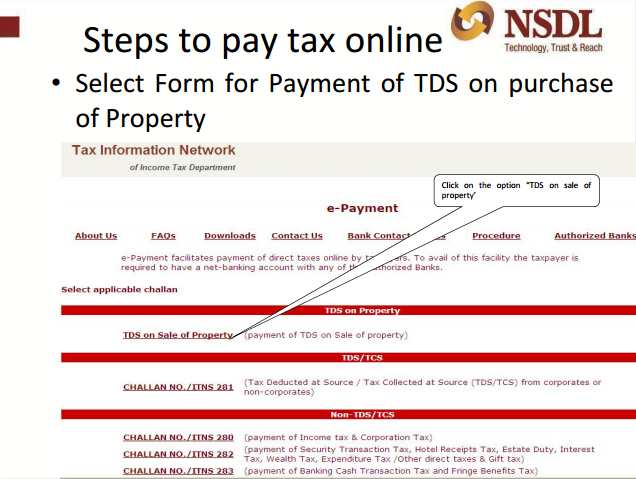
  • Under TDS on sale of property, click on the option “ Online form for furnishing TDS on property”.
online-form
Online form for furnishing TDS

  • Select form for Payment of TDS on purchase of property. Click the option “TDS” on sale of property.
form-of-payment
form of payment
  • Select Financial Year from the drop down for which payment is to be done.
  • Select Tax applicable for which payment is to be done.
  • Mention PAN of Transferee/Buyer (Don't have PAN visit here to, Apply for new PAN).
  • Mention PAN of Transferor/Seller.
  • Re-enter PAN of Transferee/Buyer.
  • Re-enter PAN of Transferor/Seller.
e-payment
e- payment
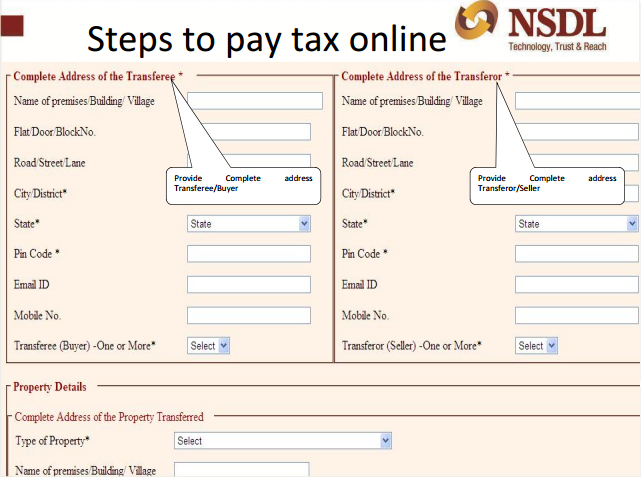
  • Provide Complete address of Transferee/Buyer.
  • Provide Complete address of Transferor/Seller.
  • Provide Complete address of Property transferred.
steps-to-pay
steps to pay tax
  • Mention the date of Agreement/Booking of property.
  • Mention the Total value of consideration (Property Value).
  • Mention if the above payment is done in Lump sum or in Installments.
pay-tax
pay tax
  • Please select the amount paid/credited (Enter the amount paid to the Transferor/Seller).
tax-online
steps to pay tax online
  • Please enter the TDS rate (Tax rate at which the TDS was deducted by the purchaser at the time of purchase of the property).
  • Please enter the TDS amount to be paid (amount deducted by the purchaser at the time of purchase of the property).
online-tax
online tax
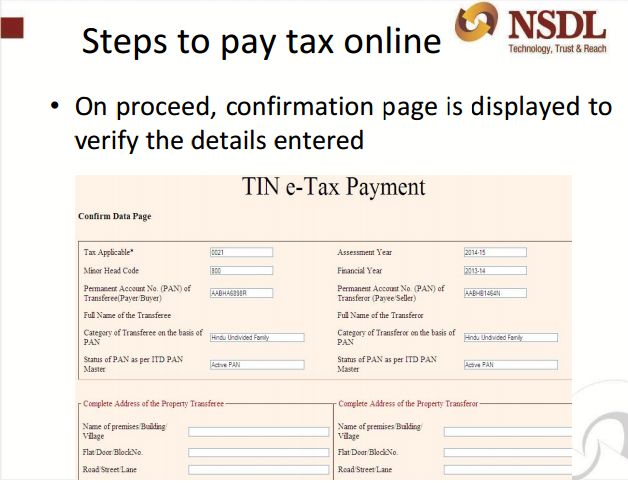
  • On proceed, confirmation page is displayed to verify the details entered.
e-tax
e tax
  • In case you have made a mistake in data entry, click on “EDIT” to correct the same.
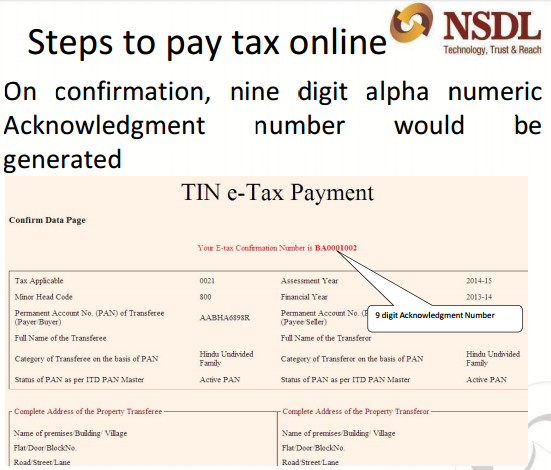
  • On confirmation, nine digit alpha numeric Acknowledgment number would be generated.
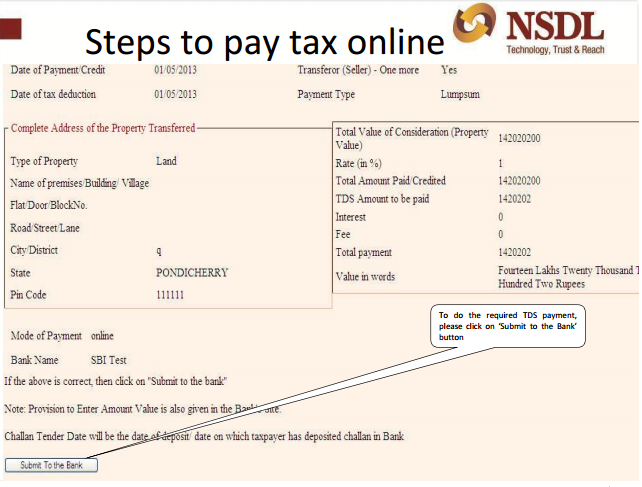
  • To do the required TDS payment, please click on ‘Submit to the Bank’ button.
  • On clicking on Submit to the Bank, deductor will have to log in to the net-banking site with the user ID/ password provided by the bank for net-banking purpose.
steps-online
steps for pay online tax

  • On confirmation, nine digit alpha numeric Acknowledgment number would be generated.
conformation
conformation

  • To do the required TDS payment, please click on ‘Submit to the Bank’ button.
submit
submit

  • With the user ID/ password provided by the bank for net-banking purpose, the detector will have to login to the net-banking site on clicking on Submit to the Bank.
  • Enter payment details at the bank site, on successful login.
  • The bank name through which e-payment has been made; payment details and containing CIN will be displayed on successful payment a challan counterfoil.

Points to remember while depositing Tax online

  • From the sale consideration of property deduct tax @ 1%.
  • In the online Form for furnishing information regarding the sale transaction, PAN of Seller as well as Purchaser should be mandatory furnished.
  • In quoting the PAN or other details in the online form do not commit any error as there is no mechanism for rectification of errors. You are required to contact Income Tax Department for the further purpose of rectification.
  • Field marked with * are mandatory.
  • In any of the fields do not enter double quotes (“ ”).
In case of any further queries/concerns please contact TIN Call Center at 020-27218080 or email  at  tininfo@nsdl.co.in

Saturday, 18 October 2014

Check your PAN Name, Verify PAN

Check your PAN Name, Verify PAN

Their is frequent queries on how can i verify pan details, PAN no income tax assessing officer ward and circle no. or how can i track status of my PAN application status.
To know about PAN related information including PAN address and PAN details, we provide below five tricks to verify PAN .
Query 1: How to check PAN Name/or How to Verify your PAN ?
Reply:  If you want to check your PAN name, PAN jurisdiction and to check whether a PAN number is correct or incorrect, then
  1. Click here => and Just fill your PAN in the Box and
  2. Enter the captcha code of six numbers and
  3. Click on submit button.
  4. Your PAN details will be shown in a new window.

PAN-details


Query :  I have applied for new PAN. Please advice how can I verify PAN application status?

You can get PAN application Status by visiting the agency you have applied your PAN number.

If you have applied PAN through, NSDL then, please click here.

Following Inputs information are required: 

1) 15 DIGIT ACKNOWLEDGMENT NUMBER OF PAN APPLICATION

                                                                 OR
2) NAME & Date of Birth/Incorporation/Agreement/Partnership or Trust Deed/Formation of Body of Individuals/Association of Persons
OUTPUT RESULT: YOUR NAME, PAN, DATE OF DISPATCH of PAN Card

Following Inputs information are required: 

1) 15 Digit Coupon Number Or Application Number
 OUTPUT Result: Your Name, Pan, Date Of Dispatch

Query: How can I Apply for new PAN ?

Reply: Please visit here to apply for new PAN

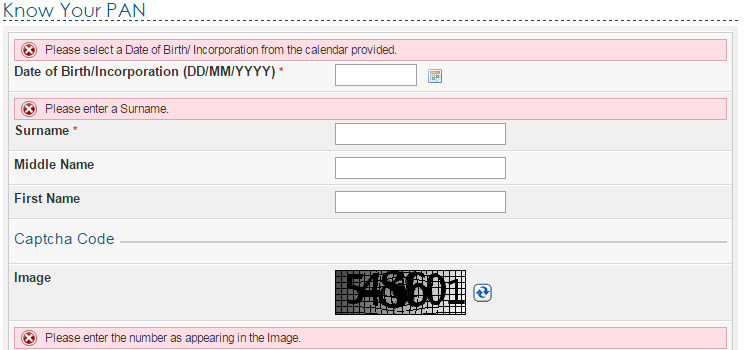
Query : How can I know about my PAN number by filling Name & DOB/DOL? 

ReplyYou can click on this link to know your PAN no. or verify PAN no of any other individual.
1.         DOB
2.        Surname and
3.        Individual Name
4.       Captcha Code.
5.       Click on submit
It will take you to new window and will show the PAN no.

know-your-pan
Check your pan number
In case, their are multiple PAN card holder with same name and DOB then in next window it will ask to verify and enter following details
  1. Father’s First name ,
  2. Father’s middle name and
  3. Father’s surname.

Query 4: I have entered the PAN name and surname correctly. But still I am not able to find / or verify my PAN number ?

Reply: With the right spelling it’s very difficult to put first, middle, surname. In case you are still not able to verify pan no then please call customer care number at 1800 180 1961

Query: How to check Status of PAN for HUF ?

Reply: To know about HUF, Firm, Company etc PAN number full name is to be filled in the column of surname and DOB column, date of Incorporation is to be given.
To ensure that you are able to verify your PAN details , please remember following things :
  1. Enter the name you have filled in PAN application.
  2. Make sure that you have not entered your surname as first name and vice versa.
  3. If your name is of one word only then Surname column is must then fill it in surname. Suppose Neeraj is your first name then to know PAN number fills it in surname.
  4. ie enter Name as Neeraj and surname as Neeraj
  5. Fill the date of Birth (DOB) in dd-mm-yyyy format .Use – as separator and please don’t use / backslash. (Dot) or_ (underscore).
  6. Never give application to PAN agents to fill in your PAN applications
  7. Keep a copy of PAN application with yourself.
Query:  How to Track Your PAN through SMS If Applied On NSDL/TIN-FC ?
INPUT: SMS to 53030 with a message containing followed by a space the word PAN and the acknowledgment number of 12-digit provided at the time of submission of application i.e PAN ACKNOWLEDGEMENT NUMBER.
SMS to 53030 with a message contain followed by space the word TAN and the acknowledgement number of 14-digits provided at the time of submission of application i.e, TAN ACKNOWLEDGEMENT NUMBER.
 OUTPUT: Your PAN, Name, Date Of Dispatch
Query:  I dont understand the key words in PAN number. Can you please explain the PAN Structure?
Reply: Permanent Account Number (PAN) is issued by Income Tax Department is a Ten digit alphanumeric identifier. Each assesses is issued a unique PAN e.g- individual, firm, company etc.
  • 1-5 fields are alpha (A to Z)
  • 6-9 fields are numeric (0-9)
  • 10 fields is alpha (A-Z)
1.    Forth field of pan denotes assesses status :
  • for individual=”P”
  • for Company=”C”
  • for Trust =”T”
  • for partnership firm=”F”
  • Body of Individual:”B”
  • Association of persons:”A”
  • HUF=”H”
  • Local authority:”L”
  • Govt.=”G”
  • judicial artificial person:”j”
2. Fifth field of PAN denotes
In case of individual: Surname/last name(as given in pan application)
  • for ex. in case of Deepak Kumar(individual)
  • 5th field will be “K”
  • 4th field will be “P”
  • In case of Deepak Kumar Gupta(Individual)
  • 5th field will be “G”
  • 4th field will be “P”

  • In case of All Other Assesses 
  • 5th field will be first letter of Name/first Name
  • for ex : In case of Rahul Gupta and sons (HUF)(confirmed)
  • 5th field will be “R”(first letter of First name i.e Rahul)
  • 4th field will be “H”(for Huf)
  • for ex: in case of Reliance LTD (confirmed)
  • 5th field will be “R”(first letter of First name)
  • 4th field will be “C”(for company)

Query: Is it compulsory, to file return if i have PAN card? 

Reply: No, It is not mandatory to file Return if you have PAN card. Return filling is compulsory if your total income in current year is above the exempltion limit. For current year income tax slab visit here.

Query: I want to file income tax return. Can you please help? 

Reply : Yes, we can assist in filling tax return online ,
If it is salary Return, Please visit here.
If you are professional then please click here for professional Return

Thursday, 9 October 2014

Last date for DDA housing scheme extended to Oct 15

DDA flats forms Rohini 2014
The Delhi Development Authority (DDA) has extended the last date of submission of the application form to October 15,
DDA officials said applications can now be filed till 5:00 pm on October 15.
Earlier, the last date to file applications was October 9.
 
The draw date for DDA Housing 2014 has also been extended to 5th November from earlier date of 29th October.
The official added that 20 lakh forms have been sold, of which 17 lakh were sold at DDA counters. Though 3.5 lakh forms have been submitted, officials claim majority of them were submitted in the last three days.
. The applicants who have not yet registered for the scheme can fill online application for DDA scheme through 13 empaneled banks.


Sunday, 21 September 2014

DDA Application Finance charges for various Banks

DDA flats forms Rohini 2014
All Bank are financing DDA application money of Rs 1,00,000/-.
Charges of Private banks are more as compared with Charges of Nationalised bank.
Cheapest Finance charges for DDA application is Given by PNB where as highest finance charges for DDA flats is charged by Axis Bank.
Some banks are offering option to apply online. You just need to fill in your personal details and make payment. It is very easy to fill the application online. Online application is convenient"
  1. It saves DD making charges
  2. Saves you from hassles of filling offline form and making mistake. Offline form is required to fill in black ink and mmistakesare not allowed. In case of any mistake, again new form for Rs 150/ has to purchased.
  3. it saves your form hassle of visiting bank

Finance Charges of various banks for DDA application bank is given below:

  1. PNB Bank  Rs 3,381/-
  2. State bank of India Rs 3550/-
  3. Icici bank Rs 4050/-
  4. Axis bank Rs 4050/-
  5. Indusland Bank Rs 4000/-
  6. IDBI Bank Rs 4200/-
Charges mentioned above are applicable in Faridabad. These charges may vary in Delhi and Noida, because of difference in stamp charges which bank has to bear for processing of this application money.

Link for online submission of DDA flats is given below:

  1. HDFC Bank Online                         https://www.payumoney.com/dda/#/hdfc
  2. Axis Bank Online                             https://easypay.axisbank.co.in/
  3. Icici Bank  Online                            http://icici.formzero.in/
  4. Idbi Bank Online                             http://www.idbi.com/Housing-Scheme-Disclaimer.asp
  5. Union Bank of India Online            http://unionbank.formzero.in/
  6. Kotak Mahindra bank Online          https://www.payumoney.com/dda/#/kotak
  7. Central Bank of India Online           https://www.payumoney.com/dda/#/centralbank
  8. Corporation Bank online                 http://www.corpbank.com/apply-online/dda-housing-scheme-2014
  9. Yes Bank online                                https://www.payumoney.com/dda/#/yesbank
  10. PNB online                                        https://www.payumoney.com/dda/#/pnb
You can now visit and view DDA sample flats


Tuesday, 2 September 2014

DDA application form and Propectus for DDA Flats scheme 2014

You can download DDA application form


How To apply for DDA Flats in DDA Flats scheme 2014

  1. Buy a brochure of Rs 150 from selected branches of any of 13 banks empaneled by DDA.
  2. Brochure can be downloaded from DDA website but Rs 150 ( forms fee) would have to paid along with application money.
  3. Brochures will not be available at DDA headquarter Vikas Sadan.
  4. No Documents are required to be attached with the DDA application.
  5. PAN no is mandatory to be provided in the application.
  6. Aadhar card is not mandatory.
  7. Forms can be submitted at 13 bank branches given below
  8. Application money: A draft of Rs 1,00,000 have to submitted along with the application for general category and Rs 10000 for EWS category.
  9. Payment  by cheque will not be accepted
  10. In case of online application, Payment can be made by way of NEFT/RTGS
  11. In point 14, please select your location preference, as per codes mentioned in Annexure A
Know how to apply for DDA flats scheme 2014
DDA prospectus

Saturday, 9 August 2014

Corporate Fixed Deposit High Rate of Interest with very high Risk.

Corporate Fixed deposits offer High Rate of interest. Generally Banks offer 9 to 10. 5 % Rate of interest for period over 12 months.

Comparative Rate of Interest of Corporate's is given below.

COMPANYRATING6 MON1 YEAR2 YEAR3 YEAR
DHFL Aashray Deposit Scheme 13 Months-Trusts OnlyCARE-AA+ and BWR-FAAA 10.50%  
DHFL Aashray Deposit Scheme 14 Months-General OnlyCare AA+ and BWR FAAA  10.50% 
DHFL-Aashray Deposit PlusCARE-AA+ and BWR-FAAA 101010
GRUH Finance LtdCRISIL-FAAA & ICRA-MAAA 99.259.5
HDFC LIMITEDCRISIL-FAAA, ICRA-MAAA 9.49.49.3
HDFC LTD-PLATINUM DEPOSITCRISIL-FAAA, ICRA-MAAA 15 MONTHS: 9.50%22 MONTHS: 9.50%33 MONTHS: 9.50%
HUDCOFITCH-TAAA, CARE-AA+ 9.158.858.9
LIC HOUSING FINANCE LTDCRISIL- FAAA 99.259.4
Mahindra and Mahindra Financial Services LtdCRISIL-FAAA 9.25%10.00%10.25%
NATIONAL HOUSING BANK(SUNIDHI SCHEME)CRISIL-FAAA, FITCH-TAAA 8.758.759
NATIONAL HOUSING BANK(SUVRIDHI SCHEME)CRISIL-FAAA FITCH-TAAA    
PNB Housing Finance LtdFAA+ by CRISIL 9.59.59.5
Shriram Transport Finance UNNATI SchemeCRISIL-FAA+ & ICRA-MAA+ 9.259.7510.75
SIDBICRISIL-FAAA, CARE-AAA 8.75%8.50%8.50%
KTDFC Ltd  10.2510.2510.25
Bajaj Finance LtdFAAA By CRISIL, MAAA By ICRA 9.259.49.65
My father was also lured by High rate of interest of Corporate Fixed Deposit and made mistake of his life. He invested in big Corporate Builder's . He made 3 Fixed deposit with 3 big builder Jaypee, Unitech and Ansals API for Rs 50000 each. Idea behind investing in three different Fixed deposit was to distribute risk equally. Well he was successful in distributing risk, as only Jaypee gave money within 15 days of due date.
Others like: Ansals and Unitech are cash crunched.

Funds not available for paying back Fixed Deposits:

Their customer care , did picked up the phone and softly said that we are short of funds and our paying back period is now Eight month late.
ie for customers whose Fixed Deposit matured on 31.12.2013, are being paid in August 14.
And since his fixed deposit has matured in Jun'14 then we can expect Fixed Deposit amount -by mar 15.
Liquidity: Funds are available when required:
Well tragedy is that he had invested money from pension and provident fund and now when he needed money for medical expenses then the money is not available to use.

Loss to investor:

Well customer care executive did say that we will not let investor suffer. Both Unitech and Ansals are paying 18% rate of interest on delayed payment.

Is Money safe, Will I get money back from Corporate Fixed Deposit

Yes due to recent cases like Sahara India ( where  Sahara chief was sent to jail for not paying Fixed deposit ) and changes in Investor protection law by CLB , i am hopeful that we will receive our money back.

Final Judgement not to invest in Corporate Fixed Deposit

My advice to Dad had been to invest in Bank Fixed Deposit or PPF because they are safe. And my advice to all investor is not to deposit money in these Corporate Fixed Deposit.

How to lodge complaint to get your Fixed deposit money back.

Corporate FDs are an unsecured investment and, to that extent, unsafe. You should have known this at the time of your investment.
There are many companies which are not as good as Jaypee , Unitech and Ansals. In such case follow these steps:
1) File a complaint with Investor Grievance Cell : Filing a complaint with the company's Investor Grievance Cell. A written and duly acknowledged letter is preferred.
2) Follow Up: Keep calling at their Fixed Deposit Department Telephone no. Telephone numbers are available on Fixed deposit and corporates Website. Unitech Tel no is 0124-4697800 and Tel no of Ansals is 011-23353550.
3) MCA and CLB:  File a complaint against the company on the website of ministry of corporate affairs (MCA) as well as the Company Law Board (CLB). Once you file the complaint with MCA and CLB, the chances of getting your money increases.
File Your Complaint at http://mca.gov.in/MCA21/index.html